 VCT
Dify 1.19.0 release notes
Dify 1.19.0 was released on November 4, 2026. The latest version is 1.20.0.
Release notes
Dify 1.19.0 brings nested workflow tracing to your observability tools. Follow a workflow into the Workflow Tools it calls, inspect the steps inside each invocation, and keep the LLM context alongside the execution tree.
This release also makes Workflow Tools portable with App packages, adds Skill Hub automation, and makes Agent files easier to upload and preview. The bundled plugin daemon is upgraded to 0.6.14-local.
Release highlights · Upgrade guide · Detailed changes
Release highlights
Nested workflow tracing
See what happens inside a Workflow Tool, all the way down to its LLM calls.
Building on the Console drilldown introduced in 1.18.0, new external traces now include the persisted execution steps inside called Workflow Tools. Child steps appear beneath the Tool span that invoked them, preserving the hierarchy across nested and repeated calls. (#44673)
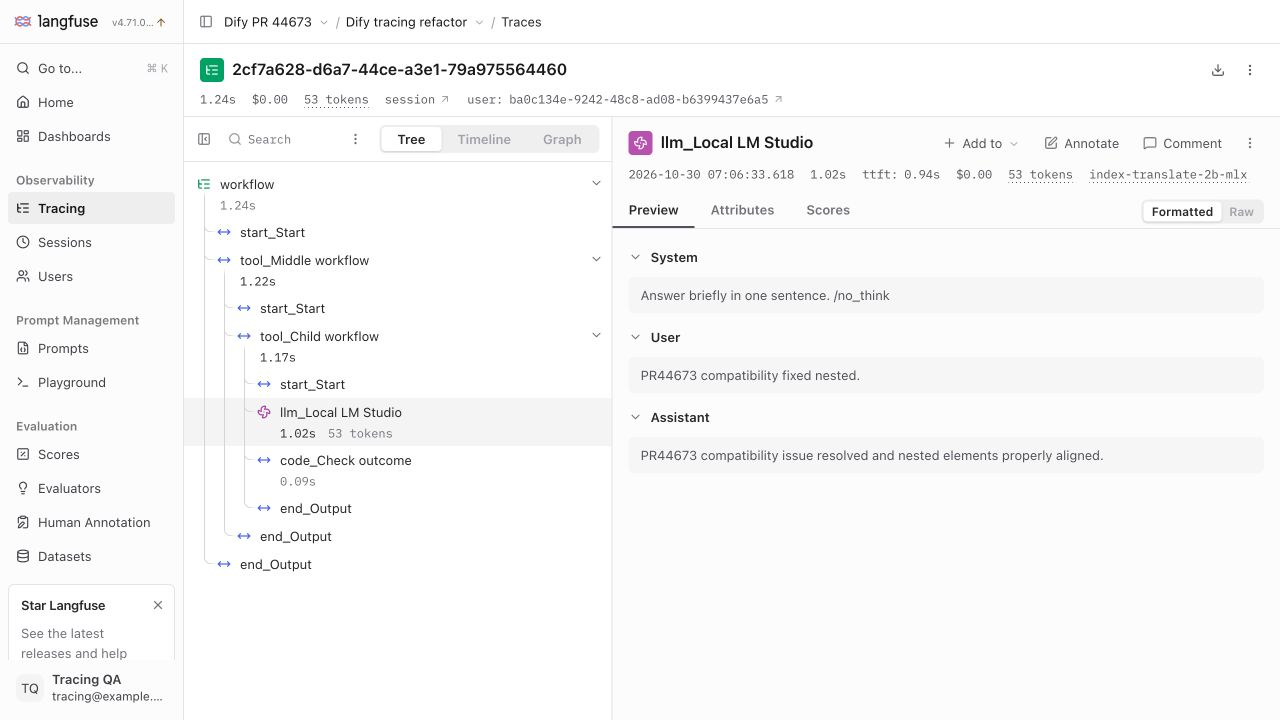
From the outer workflow to a nested LLM call: the execution tree and formatted messages, together in Langfuse. Screenshot from #44673.
- Follow the hierarchy. Expand called Workflow Tools to see their internal execution steps under the invoking Tool span.
- Understand each invocation. Repeated calls and failures retain their place in the trace.
- Keep the LLM context. Inspect formatted prompts and responses, token usage, and project, trace, and observation links.
[!NOTE] Your saved provider settings continue to work. The richer hierarchy applies to new executions; historical traces are not backfilled. Independently nested workflow runs remain separate traces linked by parent identifiers. For rolling deployments, follow the tracing queue transition below.
Take Workflow Tools with your apps
Export an app and bring the workflows behind its Workflow Tools with it. .ifpkg packages include those workflows at their bound versions, including transitive dependencies. Import reuses tools already in the destination workspace and recreates, publishes, and registers missing ones, remapping their references. (#44592)
All Dify app exports now use package format v2, including apps without Workflow Tools. Existing v1 imports and explicit YAML export remain supported. See the upgrade guide before importing new packages into older installations. (#45353)
Upload together. Preview in place.
Select or drop multiple Agent configuration files and upload them in parallel. Successful uploads are bound in one atomic batch, concurrent Composer saves preserve the latest files, and Prompt uploads keep the cursor position while inserting multiple references. (#44947)
Read PDFs inline, inspect source files with syntax highlighting, and see when text has been truncated. Previews cover configured files, Skill members, and working-directory files, with a download action when a PDF cannot be loaded. (#45032, #45045)
See Agent file uploads and previews[Inline PDF preview in Agent files, with the research brief and file list]
Read a PDF directly in the Agent file preview and switch between project files.
[Agent batch upload dialog with a PDF, Python source file, and Markdown guidelines selected]
Select several files and upload them together.
[Syntax-highlighted Python source in the Agent file preview]
Inspect source files with syntax highlighting and line numbers.
Developer spotlight
Manage workspace Skills through OpenAPI and difyctl. Find and inspect Skills, export a draft or published version, import local files, and publish a new version from the command line. (#44941)
The six Skill commands| Command | Capability |
|---|---|
difyctl get skill |
List Skills, with keyword and tag filters. |
difyctl describe skill |
Read details, the draft hash, and latest published version. |
difyctl get skill version |
List published versions. |
difyctl export skill |
Export the draft or a selected published version as ZIP. |
difyctl import skill --files <dir> |
Create a Skill or replace an existing Skill's draft from local files. |
difyctl publish skill |
Publish the draft as a new version. |
These operations require an account caller, the corresponding workspace permissions, and Skills to be enabled. Import does not publish. Importing over an existing Skill is classified as destructive; the operation catalog and CLI help distinguish read, write, and destructive operations. (#44941, #45314, #44587)
Upgrade guide
[!IMPORTANT] Read the upgrade guide before deploying. Docker Compose now requires v2.35.0 or later. Preserve existing environment files, upgrade the Dify components together, and use the new tracing queue during rolling deployments. New App packages use format v2 and require a compatible destination importer. The bundled plugin daemon moves to 0.6.14-local.
Compatibility and rollout
- Back up first. Retain the database, vector-store data, uploaded files, Agent snapshot/workspace storage, deployment secrets, and environment files. Use a maintenance window for a single-stack upgrade.
- Upgrade the components together. Use matching
1.19.0API, worker, web, Agent Backend, and Local sandbox images, with plugin daemon0.6.14-local. Keep the existing Local sandbox authentication token and any configuredPASSWORD_PEPPERunchanged. If upgrading from before 1.18.0, also follow the 1.18.0 upgrade guide. - Use Docker Compose 2.35.0 or later. This is the minimum supported version for root
.envoverrides to take precedence when Compose resolves service defaults. Check your installed version withdocker compose version. (#45359) - Keep tracked defaults separate from local overrides. Bundled
docker/envs/**/*.defaultsfiles load automatically. Customize a service through its matching local.envfile, using the override path documented in the defaults file; rootdocker/.envholds deployment inputs and explicit overrides. Preserve existing.envfiles and edit them in place. Review accidentally empty assignments and values pinned by older template copies before upgrading. (#45359, #45376) - Existing
shared.envfiles remain supported. Common API, worker, and Beat customizations now belong indocker/envs/core-services/api-worker.env. Compose still reads legacydocker/envs/core-services/shared.envfirst, thenapi-worker.env, soapi-worker.envwins when both set conflicting values. Rootdocker/.envtakes precedence over both. An unchanged copy ofapi-worker.defaultspreserves existingshared.envcustomizations. See the Docker configuration guide. (#45376) - Separate tracing queues during a rolling upgrade. New tasks default to
OPS_TRACE_QUEUE=ops_trace_v2; API, workers, and Beat must agree. CustomCELERY_QUEUES,CELERY_WORKER_QUEUES, or--queueslists must include the new queue. Keep old tracing workers onops_traceuntil old producers and all their queued, active, reserved, scheduled, and retry work have finished. Do not purge the old queue or ask the new retired handler to export legacy messages. See the tracing rollout guide. (#44673) - Upgrade package destinations before importing new App packages. New app packages always use format v2. Older importers, including builds with the earlier strict v2 rule, may reject them. Version 1 imports remain supported on 1.19.0. Explicit YAML export remains available, but does not carry bundled Workflow Tool dependencies. (#44592, #45353)
Docker Compose
Once the 1.19.0 release tag and images are published, stop a single-stack deployment gracefully, switch to the release, retain and review configuration, then pull and start the new images:
cd dify/docker
docker compose stop -t -1
git fetch --tags
git checkout 1.19.0
# Merge required configuration changes into existing env files here.
docker compose pull
docker compose up -d
Keep API startup migrations enabled (MIGRATION_ENABLED=true), or apply the full migration chain through your managed migration process before starting new workers. For rolling deployments, follow the separate tracing-queue sequence instead of mixing old and new consumers.
Configure shared plugin credentials, PLUGIN_DAEMON_KEY and PLUGIN_DIFY_INNER_API_KEY, in root docker/.env so the daemon and its clients receive matching values. Ports, volume paths, profiles, and health-check scheduling also remain root configuration inputs. See the Docker configuration guide. (#45359)
Source deployments
Use Python 3.13, Node.js 24.22.1 or later in the 24.x line, and pnpm 12.16.1. pnpm no longer provisions Node.js for the workspace, so install the required Node.js runtime separately. (#44976, #45094)
From the repository root:
uv sync --project api --frozen
uv run --directory api flask db upgrade
pnpm install --frozen-lockfile
Rebuild the web application and restart API, worker, scheduler, and Agent services from the same release. Refresh the standalone Agent Backend's locked server dependencies when deploying it separately.
difyctl
Install the matching 1.19.0 client and use difyctl help to discover the current server catalog. Refresh installed agent skills with difyctl install skills <dir>. Workflow and Chatflow automation should use the revised stop.run operation; message-based apps use stop.task.
Upgrading from 1.18.0 applies six migration revisions, ending at 53c10126d551. Apply the complete chain through the normal migration runner.
Operational changes to plan for include:
- Storage-cleanup indexes (
d7e9a1c3f502). Add reference indexes onmessage_files.upload_file_id,workflow_node_execution_offload.file_id, andworkflow_draft_variable_files.upload_file_id. PostgreSQL creates them concurrently, but index construction still scans data and consumes I/O. Online upgrades reuse matching healthy indexes and reject conflicting or invalid definitions. Investigate an interrupted invalid build before retrying; do not drop healthy indexes as routine recovery. (#44982) - Tracing configuration uniqueness (
53c10126d551). Keep one configuration per app/provider and add a unique index. When duplicates exist, the most recently updated row wins, with the ID breaking timestamp ties. Superseded rows are deleted; downgrading the index does not restore them. Retain a database backup. (#44673) - Extraction changes affect newly processed content. Re-import or re-index documents whose stored content was affected by the EPUB, EML, DOCX, CSV, Markdown, or Notion fixes. The repeated-PDF-preview fix prevents new duplicate assets for source uploads; it does not remove duplicates already stored. (#44836, #44953, #44905, #43505, #43434, #45053, #44684)
- Tracing history is not rebuilt. Existing Agent trace-ledger data remains readable, but previously exported traces do not acquire the new nested spans. (#44673)
Detailed changes
New capabilities · tracing, packages, and SkillsTracing and provider integrations
- Consolidate delivery through the shared provider interface for Langfuse, LangSmith, Opik, Weave, Arize, Phoenix, Aliyun, MLflow, Databricks, and Tencent. Retryable exports resend the same trace unit with deterministic identifiers. (#44673)
- Include called Workflow Tools' persisted execution frames in external exports, under their invoking Tool spans. Independently nested workflow runs remain separate traces linked by parent identifiers. (#44673)
- Keep trace credentials write-only. Blank or omitted secrets preserve stored values; changing a destination host, endpoint, or URL requires entering its secrets again. (#44673)
Portable App packages
- Package the workflows behind called Workflow Tools, including transitive dependencies, with a default maximum of 20 bundled tool workflows. Missing destination tools are recreated and published; existing tools are reused. Creating missing tools requires tool-management permission and sufficient app quota. Packages needing DSL-version confirmation are rejected in this flow, and apps created before an import failure are cleaned up. (#44592)
- Always emit format v2 for App packages, including nested packages and packages without Workflow Tools. This does not change the separate roster-Agent package format. (#45353)
- Workflow and API tool IDs no longer become spurious
langgenius/<uuid>plugin dependencies during export. (#44592)
Skills and OpenAPI
- Export drafts or published Skill versions, import folders, and publish through account-authenticated workspace operations. An import with a Skill ID replaces that Skill's draft; the imported
SKILL.mdname must match. Optionaldraft_hashchecks reject stale replacements, but use second-resolution timestamps and do not detect edits made within the same second. (#44941) - Skill import drops operating-system junk, rejects unsafe or duplicate paths, enforces file/size limits, reuses identical binary assets, and removes assets written by a failed import. Literal dashes inside Skill frontmatter are preserved. (#44941, #43602)
- The operation catalog publishes each operation's effect, and CLI help displays it. Workflow/Chatflow stopping uses stored run ownership and state; unknown runs return
404, and finished or otherwise non-stoppable runs return409. Message-app stopping keeps its task-ID semantics. (#44587, #45314) - Add the experimental
@dify/openapi-content-mapperpackage for typed API calls and query helpers inferred from OpenAPI sources, with reusable schema/input/output types and opt-in contract-compatible type subpaths. This is development groundwork; these changes do not migrate production Console or Marketplace calls away from their existing clients. (#44627, #44915)
- Batch Agent file management: multi-select and multi-file drop, parallel uploads, one atomic binding request, retry using cached upload IDs, and protection against stale Composer saves overwriting newly bound files. Existing single-file endpoints remain compatible. (#44947)
- More usable previews: highlighted text, on-demand PDF rendering, stable open previews, and explicit truncated-text notices across Agent files, Skills, and working directories. (#45032, #45045)
- Direction and keyboard support: synchronized locale direction, broader right-to-left layouts, date/time pickers integrated with forms and focus containment, visible labels retained in accessible names, and consistent read-only controls. (#44621, #43869, #44638, #44650, #44593, #44755, #44772, #44589, #45036, #45375)
- Safer editing dialogs: deletion, rename, metadata, annotation, member-role, and plugin-setting dialogs preserve their sessions and drafts, keep pending actions open, and restore focus after completion. Repeated deletion submissions are blocked while a request is pending. (#44618, #44623, #44643, #44646, #44698, #44736, #44743, #44810, #44825, #44788, #44715, #44652, #44838, #44830)
- Clearer feedback: field errors and persistent notices appear near the controls they concern, with shared alert presentation across apps, workflows, knowledge, billing, and Skills. Cloud billing uses localized prompts for retryable and action-specific errors. (#45151, #45264, #45266, #45267, #45268, #45192)
- Accurate Cloud quota displays: distinguish unlimited counts from zero-capacity App Run and trigger quotas, and interpret reset dates as Unix seconds. Pricing display data no longer doubles as live usage limits. (#45117, #45115)
- Lower query overhead: segment pages load child chunks and attachments in batches; new reference indexes support app storage cleanup. (#45050, #44982)
- Connection reuse: Gunicorn's configurable keep-alive defaults to 10 seconds, reducing failures caused by reusing connections after the server's shorter idle window. (#44839)
- Docker configuration: service and provider overrides now reach the relevant containers, database commands, health checks, and WebSocket settings. The generator creates only a missing root
.env, leaving optional overrides under operator control. (#45359, #45376)
- Workspace controls: enabling or disabling provider models requires an owner or administrator. Email-availability checks require account admission. (64fe95667b, 76979a1e24)
- Request-scoped cookies: pooled SSRF clients retain response cookies only within the current outbound request and its redirects, preventing later requests from inheriting another request's cookies. (#44672)
- Dataset token scope: resource access tokens can list only their explicitly bound active datasets;
include_all=truecannot widen that scope. Legacy workspace Dataset API keys retain tenant-wide behavior without inheriting an injected owner's personal visibility filters. (#44840) - App access settings: importing DSL over an existing app preserves its Web App access mode, and converting an app inherits the source access mode. (#44700, #44857)
- Tracing secrets and egress: configuration reads no longer return saved credentials, destination changes require secret re-entry, and provider traffic uses the shared outbound policy. (#44673)
- Dependency hardening: update Authlib to 1.9.1, require LiteLLM 1.100.4 or later within its supported major version, move Agent Pydantic AI to 2.53.0 and Pillow to 13.0.0, update pypdf to 6.21.4, and refresh Werkzeug, GitPython, and other dependency fixes. The standalone Agent pins filelock 4.2.1; Docker build tooling updates uv to 0.13.4. These source updates do not claim to resolve every finding in external or Enterprise base images. (#44606, #44793, #44868, #44871, #44886, #45041, #45104, #45215, #45259, #45214, #45260)
Workflows and execution
- Restore structured-output fallback for models without native support and preserve JSON booleans instead of converting them to strings. (#44962)
- Honor configured file and file-list defaults across Studio, published apps, and API execution. Explicit clearing stays distinct from omission, reset conversations restore defaults, and saving file defaults no longer sends browser Blob objects that cause
415errors. (#44780, #45042) - Preserve numeric zero in required Studio inputs and previews, and preserve both zero and false in opening statements. Non-object file-reference payloads fall back to the original reference instead of failing unexpectedly. (#45005, #44833, #45088)
- Admit streaming Workflow and Chatflow requests only once against app concurrency limits, so a limit of one accepts the single active request. Terminal Chatflow events now stop the execution watchdog and release its retained context. (#45038, #45029)
- Preserve caller identity for scheduled Agent file access, use the UTC clock for the Start node's
sys.timestamp, and order weekly schedule previews by date. Webhook query/form numbers retain integer precision and reject non-finite values. (#44796, #44847, #44718, #44706) - Refresh available workflow nodes when availability changes, retain generated variables when applying a generated prompt, escape variable-search highlighting, and preserve prompt-editor focus when variable metadata refreshes. (#44769, #45274, #44625, #44791)
- Request clear-canvas confirmation only when clearing a previously nonempty saved draft, and wrap long workflow error messages. (#45028, #45106)
Agents, tools, and Skills
- Persist refreshed OAuth credentials and serialize concurrent refreshes across tools and datasources, protecting rotating tokens and concurrent reauthorization. Temporary refresh failures return a temporary-unavailability response instead of incorrectly asking users to repair valid credentials. (#32195)
- Reject late non-terminal events after an Agent stream has completed or been cancelled. Deduplicate plugin JSON output by content rather than formatting, and retain trailing partial action/thought prefixes in ReAct output. (#45080, #45297, #43353)
- Stop serializing the entire prompt history into every Agent LLM gateway response chunk. Preserve request content, tool calls, multimodal content, usage, and quota settlement. (#45137)
- Handle non-recording tracing parents and isolate concurrent Celery tracing contexts. (#44701, #44803, #45049)
- Allow current Qwen flash models in Agent v2 and refresh suggested model patterns. Omit empty optional Agent variable inputs, and accept legacy comma-separated values for multiple-select tool parameters. (#44873, #44748, #45058)
- Restore creator-based Agent edit permissions. Skill and snippet searches treat wildcard characters literally, and imported integration bundles retain their plugin icons. (#45040, #44922, #44708, #45112)
Knowledge and document processing
- Remove index entries written by a document that was deleted during indexing. Partial QA-segment updates preserve an omitted answer and its contribution to counts. (#44364, #44997)
- Include documents missing a metadata key in negative metadata filters, honor explicit
top_k=0, normalize blank legacy retrieval settings on read, and use keyword retrieval for Economy datasets in retrieval previews. (#44753, #42980, #45020, #44895) - Restore Notion page listing and file import, keep failed page loads retryable, and surface Notion database HTTP failures. (#45053, #44893)
- Read EPUB chapters in declared order without extracting archive members to disk; preserve already-decoded EML text; identify DOCX images by relationship type; support numeric CSV column labels; and keep headings inside Markdown code fences intact. (#44836, #44953, #44905, #43505, #43434)
- Reuse extracted PDF image assets for repeated previews of the same source upload. Restore Service API file-document creation/update when tenant context is missing or the original dataset creator has left. (#44684, #44972)
- Include users' own maintained datasets in their lists. (#44795)
APIs, files, and SDKs
- Let MCP Chatflow generation commit its conversation session without a closed-transaction error. API-tool imports ignore non-method Swagger path keys. Suggested-question parsing retains brackets inside quoted questions, and missing citation resources return an empty list. (#44636, #44992, #44916, #43036)
- Normalize remote Content-Type values, preserve detected media types for uploads accepted through “Other File Types,” and apply media-specific limits during remote-upload preflight. (#44677, #41292, #44273)
- Report download HTTP failures instead of passing error pages to the plugin installer. Distinguish Squid-generated denial responses from upstream authentication errors, preserve GitHub import paths containing
blob, and reject incompatible multipart file shapes consistently. (#44333, #44841, #44280, #44903) - The Node.js SDK accepts long knowledge-document text, handles CR/LF/CRLF SSE framing and a leading BOM, and accepts an empty pagination cursor as the first page. (#44679, #44263, #44265)
- The PHP SDK serializes empty app inputs as JSON objects, avoids buffering streaming Workflow and text-to-audio responses, and sends
last_idfor conversation pagination while preserving its public method signature. (#44675, #44271, #44659)
Web app and workspace
- Keep newly created, user-maintained apps visible in Studio and preserve primary navigation across Console routes. Calculate log-period boundaries from the current date. (#44929, #44633, #45360)
- Use navigable links in document menus, open publisher destinations in new tabs, and advance integration-tour steps without reloading the page. (#44694, #44808, #44934, #44944)
- Respect Marketplace availability across template and plugin entry points and render emoji-ID icons in recommended cards. (#45009, #45027, #45066)
- Preserve annotation editor drafts and voice-input focus, and add the Simplified Chinese account-deletion success email template. (#44810, #44825, #45169, #43504)
| Setting | Change in 1.19.0 |
|---|---|
OPS_TRACE_QUEUE |
New; defaults to ops_trace_v2. Shared by trace delivery/retries, Agent trace work, payload cleanup, and sandbox metering. API, workers, and Beat must agree. |
OPS_TRACE_EXPORT_MAX_ATTEMPTS |
New; defaults to 6 total attempts for retryable trace exports. |
ENABLE_TRACE_PAYLOAD_SWEEP_TASK |
New; defaults to true, enabling daily cleanup of orphaned new-pipeline trace payloads. |
APP_PACKAGE_MAX_WORKFLOW_TOOLS |
New; defaults to 20 bundled Workflow Tool workflows per App package. |
GUNICORN_KEEP_ALIVE |
New entrypoint setting; defaults to 10 seconds. |
The old OPS_TRACE_UNIFIED_ENABLED, OPS_TRACE_RETRYABLE_DISPATCH_MAX_RETRIES, OPS_TRACE_RETRYABLE_DISPATCH_DELAY_SECONDS, and OPS_TRACE_PARENT_CONTEXT_TTL_SECONDS settings are removed. Existing Agent application-tracing opt-in settings remain supported. (#44673)
For Docker, use envs/core-services/api-worker.defaults as the reference for common API/worker/Beat settings and api-worker.env for new overrides. Existing shared.env remains compatible. Tracked defaults load automatically; root .env and explicit service overrides still take precedence. Review the service-specific references rather than replacing local files with fresh templates. (#45359, #45376)
Endpoint compatibility
- Replace deprecated Console profile-update POST calls to
/account/name,/account/avatar,/account/interface-language,/account/interface-theme, and/account/timezonewithPATCH /console/api/account/profile. Avatar URL reads remain available. (#45015) - Custom clients of
GET /console/api/apps/{app_id}/trace-configmust consumeconfigured_secretsinstead of expecting saved secret values. (#44673) - For Workflow and Chatflow OpenAPI calls, use
POST /openapi/v1/apps/{app_id}/runs/{run_id}:stop(stop.run) andGET /openapi/v1/apps/{app_id}/runs/{run_id}/events(get.run.event). Chat, Agent Chat, and Completion retain the task-ID stop route understop.task. (#44587) - Cloud education verification returns an explicit
status: eligible | not_eligibleresult; only eligible results contain a token. The corresponding internal billing service must support this response contract. (#45165)
Full Changelog: 1.18.0 to the 1.19.0
Source: GitHub release 1.19.0