VCT
Together AI offers preemptible GPU nodes at 50% of on-demand price
Preemptible nodes on Kubernetes and Slurm clusters cost 50% of the on-demand rate and can be reclaimed after a five-minute drain.
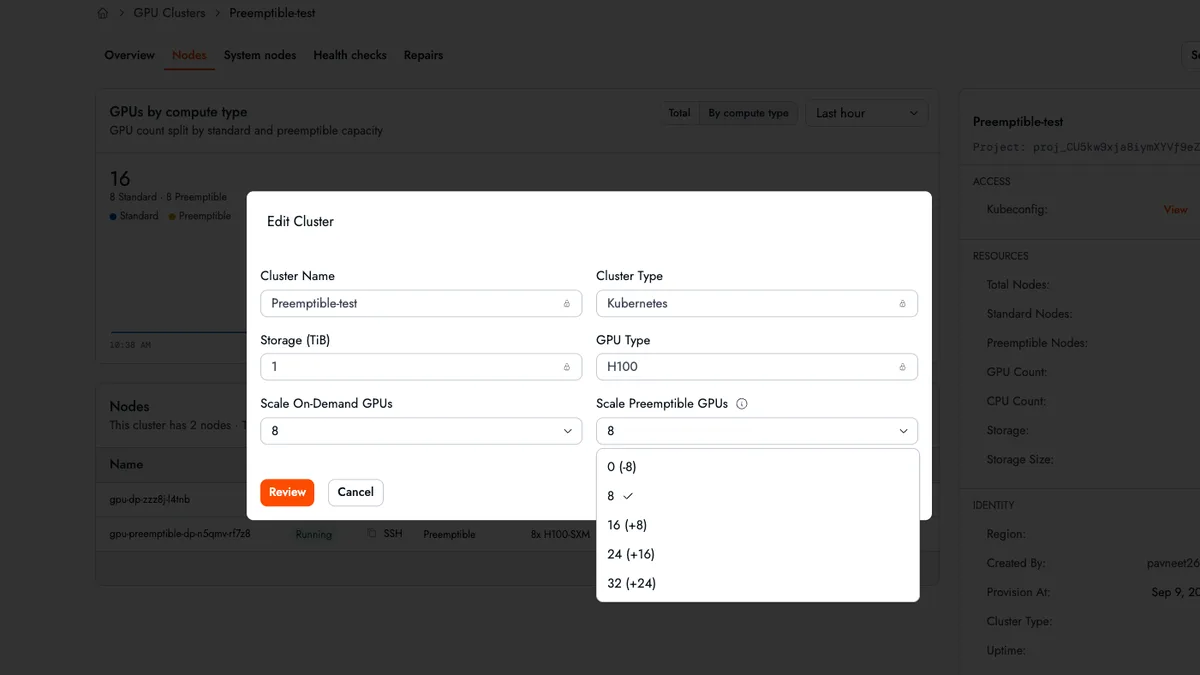
Together AI has made preemptible compute generally available on its GPU Clusters. The nodes run on Kubernetes and Slurm clusters in all regions and cost a fixed 50% of the on-demand rate. According to the company, teams can add them to new or existing clusters today.
Preemptible nodes add a second compute type next to standard nodes, which are never preempted. They use the same NVIDIA accelerated compute but draw from unused capacity that Together can reclaim. The price stays fixed and does not follow a spot market. Usage is metered every one to two minutes, so a 12-minute run is billed as about 12 minutes.
What happens when a node is reclaimed
Reclamation starts a five-minute drain. Together cordons the node and sends SIGTERM to pods, and a TogetherPreemptionNotified Kubernetes event fires. Workloads then have up to five minutes to write a checkpoint and exit. The cluster keeps its preemptible target and refills toward it as capacity becomes available, so users do not request replacements.
Which workloads fit
Together names short experiments such as ablations and evals as good candidates, provided the job can resume or retry. It also suggests the nodes for spikes in batch or internal inference demand, and interrupted requests requeue. The company says multi-day runs without checkpoints and strict-SLO serving with no fallback do not fit.
Setup
Preemptible nodes join an existing cluster under the label together.ai/compute-class=preemptible. Coordinators and user-facing replicas can stay on standard nodes. Teams set the target in the console, CLI or API, at creation or on a running cluster. The API reports desired_preemptible_gpus and allocated_preemptible_gpus, and the second can stay below the first when capacity is tight. Together advises setting terminationGracePeriodSeconds to as much as 300 seconds.